

An indie team has a project with a novel take on a genre. They have access to new technology they want to leverage. However, they needed help with their software integration and workflows. They asked me to come in as their lead engineer to solve those issues.
I’ll break down some of the challenges we faced and the solutions I applied to their problems. However, this isn’t a full breakdown of my work on this project. It’s just the workflow, pipeline, and integration aspects of a single feature. This project is still in development, so these answers may change over time.
The Problem Space
The tagline for the game’s mechanics is “conversational blackjack”, where each session is a game, each branch of a conversation is represented by a full game, and each line is represented by a single hand.
This means that the card game would be composed of several characters having conversations that can vary depending on each individual hand that’s played. Each conversation, and each line, would be fully mocapped using consumer-grade rigs. Each conversation also includes marquee moments with more involved animations, but still with spoken lines interspersed between them.
The pillars of the project
- Enable our storytellers
- Gameplay as connective tissue
- Mocap to enable performers to go beyond the page
The feature set
- Branching dialogue
- Multiple characters
- Bespoke animations per exchange
- Mocapped animations as a baseline
- Varying degrees of complexity for the animations
- Gameplay conditionals driving the conversations
The tool set
- Articy Draft X – A node-based dialogue mapping software, like Twine, Little Gem, Inkwell, etc.
- Rococo MOCAP suite – A software solution that allows users to record mocap with consumer-level hardware.
- Maya – Standard 3D modeling software.
Integration
Here is what I did to get everything integrated into Unreal, the workflows that came from it, and some of the challenges I overcame.
My first step was to define how the pieces could fit together. This meant integrating dialogue from Articy, Animations from Rococo, and 3D models from Maya in a scene.
Articy provides a plugin that generates code from an Articy project map containing the project’s node graph. Each node in that graph contains a line of dialogue, the speaker who says it, and any other annotation that writers have defined. The logic connecting those nodes is set by flow nodes, which determine what node should follow another, the conditionals that those flow nodes use, and the attributes those conditionals check when they’re executed. Articy packages all of that into custom C++ classes that are generated when its Unreal plugin detects a new Articy project map in its folders. The result of that conversion is a “Flow Player” blueprint class that, given a starting node, plays through nodes that were imported.
Workflows
What this boils down to is 4 distinct workflows:
- Dialogue – Writing and mapping dialogue in Articy
- MOCAP/Animations – Recording animations/audio through Rococo and audio recording software
- Modelling/Rigging – Character modeling and rigging are done in Maya
- Implementation – Implementing conversations in Unreal that bind models to animation in the unreal context
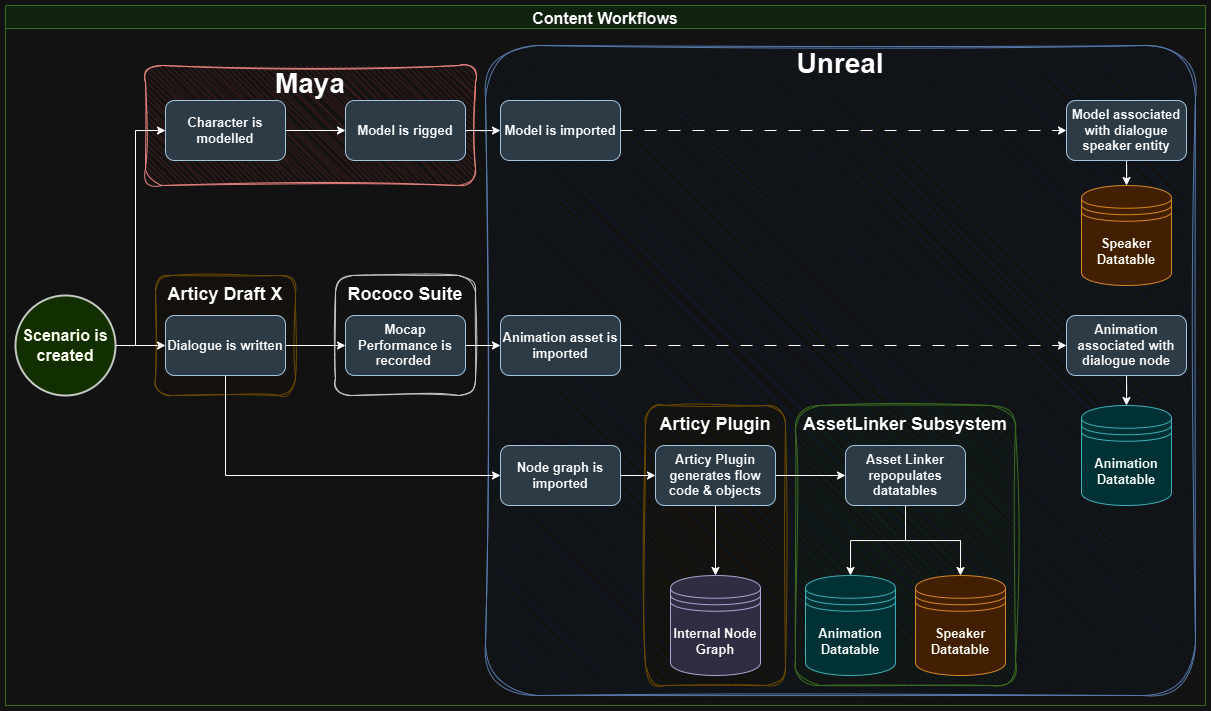
I needed a wrapper that would rely on other data sources to bind each node to an animation and speaker. I did this through the project’s custom game mode, giving it a reference for a singleton instance of the Flowplayer, along with two other data sources: an animation datatable and a speaker datatable.
DataTables
The animation datatable is linked to each node in a conversion via the node ID, which is a field that Articy creates. It also has a reference to an animation to play. The speaker datatable uses the SpeakerID, also created by Articy on import, to establish a relationship with actors in the scene and the model asset for that speaker.
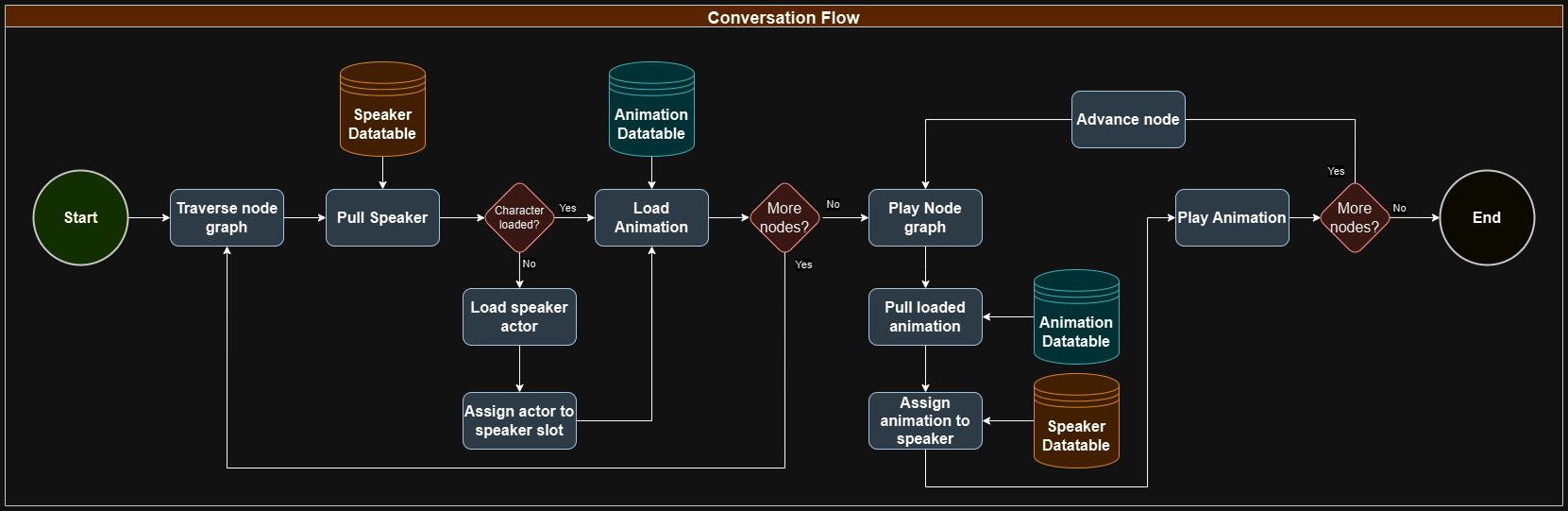
This separates the workflows for the writers and dialogue implementers. In it, writers are free to map out conversations in Articy without having to concern themselves with how those conversations translate to Unreal. Likewise, implementers just need to set up the data in the tables provided, rather than create new assets per line. This means that writers and implementers can work independently from one another. If something changes in the way that data is imported, the writers don’t have to change or update anything about how they work. If the writers iterate on a conversation, changing or removing lines, the implementers don’t have to change or update work they have already done.
Technical Challenges
Given that the Unreal Articy plug-in generates code based on the project that it’s importing, overriding the Articy classes themselves was not going to work. Additionally, modifying the code-generating classes would become an obstacle to accepting updates for the plug-in itself.
Asset Linker Subsystem
As a result, I created a subsystem called the Asset Linker subsystem. This subsystem ingests the updated Articy objects the plug-in uses to add entries in the Animation and Speaker datatables.
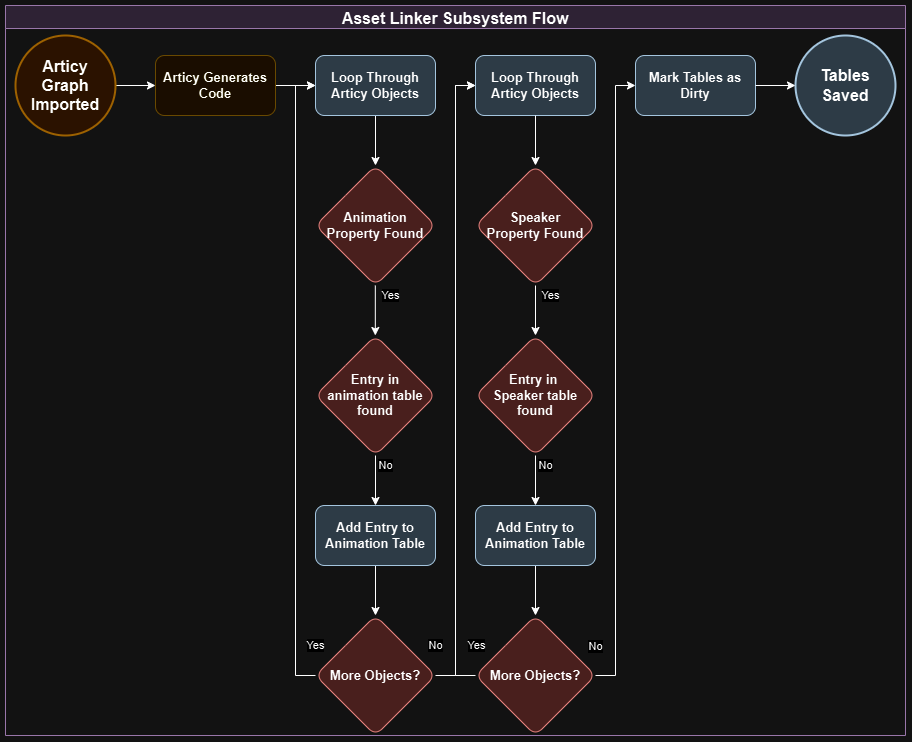
The trick here is that the classes of objects this subsystem has to target to extract node and speaker IDs don’t exist until an initial import. This means the Asset Linker subsystem isn’t portable to other projects as-is.
Typedef
I mitigated that problem by using typedefs and template functions. By using typedefs as aliases for the classes of the nodes and entities I care about in the Articy import, I was able to narrow the scope of the necessary changes to port the system over to another project to just two lines. Populating the animation and speaker datatables relies on a templated function that targets those classes.
InstanceStructs
There is another challenge that I had to overcome to make this work with a single agnostic function through the subsystem; the struct for the table’s rows is also unknown. This means that I don’t have an easy pointer I can use to link the Articy object to the row. I addressed this by using InstanceStruct.

By taking the Articy ID of the object we’re going to add to the table, we crack open the Articy ID property of the struct we’re instantiating, setting the value to the Articy ID of the object, and then adding the struct back into the datatable. This way, all we need to know is that the struct has an Articy ID field, and the same function can work on any table.
Wrap-Up
Now, I’d like to explain some of the rationale behind these solutions, and why it was important to solve those problems in the first place.
First, my main goal was to ensure that everyone in the team could do their work with as little friction as possible. I focused on creating an architecture that supported independent workflows for everyone, and that allowed people to iterate without breaking everyone else’s progress.
What I get from having the datatable as an intermediary is the ability to add new rows as necessary to a single source, with each row accomplishing the same thing as a stand-alone data asset, without having to create or delete assets as conversations change, leading to out of data assets bloating the project, or doing risky destructive asset purges.
It’s also a much more designer-friendly presentation of large collections of structurally-identical data points. Achieving the same visibility using data assets would involve creating new tooling like editor widgets and property drawers, not to mention datatable’s built-in import/export functionality.
That aside, the workflows and implementations that I built are based on the idea that all of them will have to evolve. As an example, each animation will need more information than just what animation to play on what character. There are also other elements to consider like camera angles, entry and exit poses, loops, notifies, and so forth. However, until they’re called for, I don’t know what fields I need. Nevertheless, I can prepare for those future needs. By choosing solutions that mesh well with Articy’s code generation and Unreal’s pipelines, and that can be modified in non-destructive ways, I am making those future changes as painless as possible.
 Cesar Gonzalez
Leave a comment